SOLID Principles in React
The SOLID principles were compiled by Bob Martin in a paper published in the year 2000, although the acronym itself was coined later by Michael Feathers. “Uncle Bob” is the author of the famous books Clean Code and Clean Architecture. In the latter, starting in chapter 3, he begins to cover the SOLID principles and then dedicates a full chapter to each one.
The SOLID principles help us organize functions and data structures into classes and determine how those classes interconnect. In React today we use functions instead of classes for components and hooks, however the SOLID principles are not exclusive to Object-Oriented Programming (OOP). In the book mentioned above, Uncle Bob explains that when he talks about a class he’s really referring to a group of coupled functions and data, which he also calls a module. The idea is that these modules (whether they’re classes or not) should be able to support change and also be easy to understand.
Since these are principles, there are different ways to apply them. For our project or coding style to actually benefit from them, we need to fully understand the idea behind each principle. In this article we cover a brief explanation of each principle along with some applications to Frontend projects that use React.
Single Responsibility Principle (SRP)
The Single Responsibility Principle (SRP) might seem to suggest that a function should do only one thing. While that’s good practice, Uncle Bob explains that’s not what SRP is actually about. The definition he gives is: a module should have only one reason to change, or more precisely, a module should be responsible to a single actor. In this context an actor is a person or group of people who request changes to the software.
Although Bob gives an example using OOP (more applicable to backend),
considering this example can help us understand the idea.
Suppose we have an Employee class with three methods or functions:
export class Employee {
  public calculatePay() {}

  public reportHours() {}

  public save() {}
}
Let’s think about the actors and the methods:
calculatePay()is used by the accounting department to calculate employee salariesreportHours()is used by the human resources department to know how many hours each employee workedsave()is of interest to the technical department, to save the information in the database.
In this class we have a coupling problem between different actors. If the accounting department asks us for a change and we touch this class, it could bring unexpected changes to the code used by the human resources department. The result could be bugs that cause the company millions of dollars in losses.
By applying SRP we can split this class based on the three different actors mentioned, organizing the code into three different classes:
export class PayCalculator {
  public calculatePay() {}
}

export class HourReporter {
  public reportHours() {}
}

export class EmployeeRepository {
  public save() {}
}
This way we avoid a change requested by one actor from affecting the code used by another actor.
SRP in React
How can we bring this idea to the Frontend in React? Let’s think about a component that displays a list of people. This component is responsible for determining how this list looks: font size, colors, whether it’s a table or a card list, etc. But it’s also in charge of fetching the data for these people from an API:
import { useEffect, useState } from "react";
import { Person } from "../../types";
import {
  CircularProgress,
  Paper,
  Table,
  TableBody,
  TableCell,
  TableContainer,
  TableHead,
  TableRow,
} from "@mui/material";
import { ActionButton } from "./action-button";

export function PersonsList() {
  const [persons, setPersons] = useState<Person[]>([]);
  const [isLoading, setIsLoading] = useState<boolean>(true);

  // Load persons from API
  useEffect(() => {
    async function loadPersons() {
      const response = await fetch(
        "https://jsonplaceholder.typicode.com/users",
      );
      const data = await response.json();
      setPersons(data);
      setIsLoading(false);
    }

    loadPersons();
  }, []);

  return (
    <>
      {isLoading ? (
        <CircularProgress />
      ) : (
        <TableContainer component={Paper}>
          <Table sx={{ minWidth: 650 }} aria-label="simple table">
            <TableHead>
              <TableRow>
                <TableCell>Name</TableCell>
                <TableCell>Username</TableCell>
                <TableCell>E-mail</TableCell>
                <TableCell>Company</TableCell>
                <TableCell>Address</TableCell>
                <TableCell>Phone</TableCell>
                <TableCell>Website</TableCell>
                <TableCell>Edit</TableCell>
                <TableCell>Delete</TableCell>
              </TableRow>
            </TableHead>
            <TableBody>
              {persons.map((person) => (
                <TableRow key={person.id}>
                  <TableCell component="th" scope="row">
                    {person.name}
                  </TableCell>
                  <TableCell>{person.username}</TableCell>
                  <TableCell>{person.email}</TableCell>
                  <TableCell>{person.company.name}</TableCell>
                  <TableCell>
                    {person.address.street}, {person.address.city}
                  </TableCell>
                  <TableCell>{person.phone}</TableCell>
                  <TableCell>{person.website}</TableCell>
                  <TableCell>
                    <ActionButton text="Edit" />
                  </TableCell>
                  <TableCell>
                    <ActionButton isDelete={true} />
                  </TableCell>
                </TableRow>
              ))}
            </TableBody>
          </Table>
        </TableContainer>
      )}
    </>
  );
}
So we start asking ourselves… which actors does this code respond to? Who could request changes independently of one another? We identify two actors:
- UI/UX designers: they determine how the application looks and how the user interacts with it. They will surely ask us for changes in the future.
- API provider: while this could be the same person acting as a full-stack developer, in a large project it could be a separate backend team, or if the API is outsourced it could be an external company.
Taking these actors into account, we now decide to split the code. On one hand we have a hook in charge of fetching data from the API:
export function usePersons() {
  const [persons, setPersons] = useState<Person[]>([]);
  const [isLoading, setIsLoading] = useState<boolean>(true);

  // Load persons from API
  useEffect(() => {
    async function loadPersons() {
      const response = await fetch(
        "https://jsonplaceholder.typicode.com/users",
      );
      const data = await response.json();
      setPersons(data);
      setIsLoading(false);
    }

    loadPersons();
  }, []);

  return {
    persons,
    isLoading,
  };
}
And on the other hand a component in charge of determining how the information is displayed, consuming the hook mentioned above:
export function PersonsList() {
  const { persons, isLoading } = usePersons();

  return (
    <>
      {isLoading ? (
        <CircularProgress />
      ) : (
        <TableContainer component={Paper}>
          <Table sx={{ minWidth: 650 }} aria-label="simple table">
            <TableHead>
              <TableRow>
                <TableCell>Name</TableCell>
                <TableCell>Username</TableCell>
                <TableCell>E-mail</TableCell>
                <TableCell>Company</TableCell>
                <TableCell>Address</TableCell>
                <TableCell>Phone</TableCell>
                <TableCell>Website</TableCell>
                <TableCell>Edit</TableCell>
                <TableCell>Delete</TableCell>
              </TableRow>
            </TableHead>
            <TableBody>
              {persons.map((person) => (
                <TableRow key={person.id}>
                  <TableCell component="th" scope="row">
                    {person.name}
                  </TableCell>
                  <TableCell>{person.username}</TableCell>
                  <TableCell>{person.email}</TableCell>
                  <TableCell>{person.company.name}</TableCell>
                  <TableCell>
                    {person.address.street}, {person.address.city}
                  </TableCell>
                  <TableCell>{person.phone}</TableCell>
                  <TableCell>{person.website}</TableCell>
                  <TableCell>
                    <ActionButton text="Edit" />
                  </TableCell>
                  <TableCell>
                    <ActionButton isDelete={true} />
                  </TableCell>
                </TableRow>
              ))}
            </TableBody>
          </Table>
        </TableContainer>
      )}
    </>
  );
}
We can take this idea one step further. Let’s keep thinking about the different departments in the company that uses this software, and from there different roles emerge:
- Accounting department: needs to calculate salary based on hours worked and overtime hours, so they need to see the information in this list.
- Human resources also needs to see the exact number of hours each person worked in this list, to determine whether they need to hire more staff in certain areas.
Since this is a list of people with similar data, at first we decide to use the same component for both. But if something changes in how accounting calculates overtime hours (as in Uncle Bob’s book example), this could unexpectedly affect human resources. By applying SRP we can split the code according to the actors, in this case with one component for each:
export function AccountingPersonsList() {
  const { persons, isLoading } = usePersons();

  // Rendering according to the accounting department.
  return <></>;
}

export function HumanResourcesPersonsList() {
  const { persons, isLoading } = usePersons();

  // Rendering according to the human resources department.
  return <></>;
}
Open-Closed Principle (OCP)
The Open-Closed Principle (OCP) states that a module should be open for extension but closed for modification. Put another way, a module’s behavior should be extensible, without having to modify it. This is a very deep principle and there are different ways to apply it.
OCP in React
Suppose our application requires the user to confirm before deleting a
record. For that we have a reusable modal component,
ConfirmationModal. This component uses Material UI
to draw the modal, and receives props that let the consuming code
determine the title, the confirmation text, as well as the button text:
import Button from "@mui/material/Button";
import Dialog from "@mui/material/Dialog";

type ConfirmationModalProps = {
  isOpen: boolean;
  title: string;
  text: string;
  acceptButtonText: string;
  cancelButtonText: string;
  onConfirm: () => void;
  onCancel: () => void;
};

export function ConfirmationModal({
  isOpen,
  title,
  text,
  acceptButtonText,
  cancelButtonText,
  onConfirm,
  onCancel,
}: ConfirmationModalProps) {
  const handleConfirm = () => {
    onConfirm();
  };

  const handleClose = () => {
    onCancel();
  };

  return (
    <Dialog open={isOpen} onClose={handleClose}>
      <DialogTitle>{title}</DialogTitle>
      <DialogContent>
        <DialogContentText>{text}</DialogContentText>
      </DialogContent>
      <DialogActions>
        <Button onClick={handleConfirm}>{cancelButtonText}</Button>
        <Button onClick={handleClose} autoFocus>
          {acceptButtonText}
        </Button>
      </DialogActions>
    </Dialog>
  );
}

The consumer of the component passes the confirmation message, including
a person’s name, through the text prop:
export function Example() {
  const [personToBeDeleted, setPersonToBeDeleted] = useState<
    Person | undefined
  >();
  const { person } = useGetPerson();
  const isConfirmDeleteModalOpen = personToBeDeleted !== undefined;
  const confirmDeleteModalTitle = `Confirm Person Deletion`;
  const confirmDeleteDialogText = personToBeDeleted
    ? `Are you sure you want to delete ${personToBeDeleted.name}?`
    : "";

  const onPersonDeleteClicked = (person: Person) => {
    setPersonToBeDeleted(person);
  };

  const onPersonDeleteConfirmed = () => {
    // Process person deletion
    setPersonToBeDeleted(undefined);
  };

  const onPersonDeleteCancelled = () => {
    setPersonToBeDeleted(undefined);
  };

  return (
    <>
      {person ? (
        <PersonCard person={person} onDeleteClicked={onPersonDeleteClicked} />
      ) : (
        <></>
      )}
      <ConfirmationModal
        isOpen={isConfirmDeleteModalOpen}
        title={confirmDeleteModalTitle}
        text={confirmDeleteDialogText}
        acceptButtonText="Delete"
        cancelButtonText="Cancel"
        onConfirm={onPersonDeleteConfirmed}
        onCancel={onPersonDeleteCancelled}
      />
    </>
  );
}
One day we’re asked to display the person’s name with a different
style, maybe in bold or with a different color, and also to change
how the confirmation modal’s title looks. But we don’t want to make big
changes to our original ConfirmationModal component, since there are
other consumers using it that don’t have these specific needs.
By applying the OCP principle we can adjust the component to receive
the children prop instead of receiving text, and for the title we
receive a React node instead of a String in both cases:
import { PropsWithChildren, ReactNode } from "react";

type ConfirmationModalProps = {
  isOpen: boolean;
  title: ReactNode;
  acceptButtonText: string;
  cancelButtonText: string;
  onConfirm: () => void;
  onCancel: () => void;
};

export function ConfirmationModal({
  isOpen,
  title,
  acceptButtonText,
  cancelButtonText,
  children,
  onConfirm,
  onCancel,
}: PropsWithChildren<ConfirmationModalProps>) {
  const handleConfirm = () => {
    onConfirm();
  };

  const handleClose = () => {
    onCancel();
  };

  return (
    <Dialog open={isOpen} onClose={handleClose}>
      <DialogTitle>{title}</DialogTitle>
      {children}
      <DialogActions>
        <Button onClick={handleConfirm}>{cancelButtonText}</Button>
        <Button onClick={handleClose} autoFocus>
          {acceptButtonText}
        </Button>
      </DialogActions>
    </Dialog>
  );
}
The consumer can now customize how both the title and the text are
displayed, applying the HTML <b> (bold) tag:
export function Example() {
  ...

  return <>
    { person ? <PersonCard person={person} onDeleteClicked={onPersonDeleteClicked} />  : <></>}
    <ConfirmationModal
      isOpen={isConfirmDeleteModalOpen}
      title={<div>Confirm Person <b>Deletion</b></div>}
      acceptButtonText='Delete'
      cancelButtonText='Cancel'
      onConfirm={onPersonDeleteConfirmed}
      onCancel={onPersonDeleteCancelled}
      >
        <ConfirmationModalContent>
          Are you sure you want to delete <b>{personToBeDeleted?.name}</b>?
        </ConfirmationModalContent>
      </ConfirmationModal>
  </>
}
As we can see in the example, through composition we’re using a
ConfirmationModalContent component that also receives children and
uses Material UI components to display the content:
export function ConfirmationModalContent({ children }: PropsWithChildren) {
  return (
    <DialogContent>
      <DialogContentText>{children}</DialogContentText>
    </DialogContent>
  );
}
The point is that ConfirmationModal no longer needs to be modified to
extend the way it renders its content. Now, when we show the
confirmation modal, the person’s name is in bold:

Liskov-Substitution Principle (LSP)
The Liskov Substitution Principle is named after its author, Barbara Liskov. This principle is heavily based on Object-Oriented Programming (OOP), and states that objects of a subtype should be substitutable for objects of the supertype. We’re talking about inheritance in OOP, where there are parent classes (supertypes) and child classes (subtypes) that inherit methods and properties from their parent. The principle could be explained as: if a class B extends a class A, then we should be able to use B anywhere we use A, without changing the important functionality of the application.
Let’s first look at a backend example to understand the idea. The
parent class Database is generic enough for our application to use,
which simply needs to connect to a database. We have two child classes:
the MySQL and SQLite implementations must be compatible with the
connect() method:
export class Database {
  public connect() {}
}

export class MySQLDatabase extends Database {
  public connect() {
    // Specific MySQL Code.
  }
}

export class SQLiteDatabase extends Database {
  public connect() {
    // Specific SQLite Code.
  }
}
Each one will have its own way of connecting. However, in the application code we see that when it starts up it connects to the database, regardless of which implementation it’s using, because we’re following the Liskov Substitution Principle:
class Application {
  private database: Database;

  constructor(database: Database) {
    this.database = database;
  }

  public start() {
    this.database.connect();
  }
}

const database = new MySQLDatabase();
const application = new Application(database);
application.start();
LSP in React
Let’s try to apply this idea in React, where we generally don’t use Object-Oriented Programming. Although we don’t have inheritance, we do use composition.
In this example we have three button components:
import styled from "@emotion/styled";
import { Box, Button, ButtonProps } from "@mui/material";
import { FC } from "react";

export function ButtonsExample() {
  const onButtonClicked = (buttonType: string) => {
    console.log(`Button ${buttonType} clicked!`);
  };

  return (
    <>
      <Box display="flex">
        <Button variant="contained" onClick={() => onButtonClicked("normal")}>
          Normal
        </Button>
        <SquareButton
          variant="contained"
          onClick={() => onButtonClicked("squared")}
        >
          Squared
        </SquareButton>
      </Box>
      <ContainedButton
        variant="contained"
        onClick={() => onButtonClicked("contained")}
      >
        Contained
      </ContainedButton>
    </>
  );
}

const SquareButton = styled(Button)({
  borderRadius: 0,
  marginLeft: "1rem",
});

const ContainedButton: FC<ButtonProps> = (props) => {
  return (
    <Box marginY={2}>
      <Button fullWidth={true} {...props}>
        {props.children}
      </Button>
    </Box>
  );
};
Buttoncomes directly from the Material UI library.SquareButtonis compatible with the first one, we can pass it the same props. In this case we use emotion’s styled to style the component with CSS-in-JS.ContainedButtonuses composition to customize how the button is displayed, in this case inside a Box, taking up its full width. When we do this kind of composition we have to pass all the props down to the “parent” component (in this case Button) using the spread operator{...props}.
The three different button components receive the same properties
(variant and onClick). Since they’re compatible, we can swap them
without breaking the application’s functionality.
Interface Segregation Principle (ISP)
The Interface Segregation Principle states that a software module should not depend on interfaces it does not use.
To understand the idea, let’s look at a backend example with OOP. Notice the following three service classes: one for generating user reports, another for creating users, and the last one for deleting users:
export class UserReportService {
  constructor(private userRepository: IUserRepository) {}

  public print() {
    const users = this.userRepository.getAll();
    console.log(`Printing users`, users);
  }
}

export class UserCreationService {
  constructor(private userRepository: IUserRepository) {}

  public create(user: User) {
    return this.userRepository.create(user);
  }
}

export class UserDeletionService {
  constructor(private userRepository: IUserRepository) {}

  public delete(user: User) {
    this.userRepository.delete(user);
  }
}
We’re using the repository pattern. This is the UserRepository
code, which will handle database access. It allows us to get the list
of users, as well as create or delete them:
export interface IUserRepository {
  getAll(): User[];
  create(user: User): User;
  delete(user: User): void;
}

export class UserRepository implements IUserRepository {
  public getAll(): User[] {
    return [];
  }

  public create(user: User) {
    console.log(`Creating user ${user.name}`);
    return user;
  }

  public delete(user: User): void {
    console.log(`Deleting user ${user.name}`);
  }
}
The repository implements the IUserRepository interface, which is
important since we’re talking about the segregation of the
interface principle.
If we look again at UserReportService, which generates reports, we
can notice it only uses the getAll method from the repository — of
course it never creates or deletes users like UserCreationService and
UserDeletionService do.
Now, applying the Interface Segregation Principle, we split
IUserRepository into two: one with the read methods and another with
the write methods. The repository stays the same, it just implements
two separate interfaces:
export interface IUserReadRepository {
  getAll(): User[];
}

export interface IUserWriteRepository {
  create(user: User): void;
  delete(user: User): void;
}

export class UserRepository
  implements IUserReadRepository, IUserWriteRepository
{
  public getAll(): User[] {
    return [];
  }

  public create(user: User) {
    console.log(`Creating user ${user.name}`);
  }

  public delete(user: User): void {
    console.log(`Deleting user ${user.name}`);
  }
}
This lets different kinds of clients consume only the interface they need. So instead of having a general-purpose interface, we’ve now segregated it into more specific ones. There’s no need to create one interface per client (that could result in too many interfaces); instead we’ve split it by client type, one for reading and one for writing. This opens up the possibility, in the future, of splitting the repository into one for writing and one for reading that connect to different database instances. That becomes easier precisely because we segregated the interface first:
export interface IUserReadRepository {
  getAll(): User[];
}

export interface IUserWriteRepository {
  create(user: User): void;
  delete(user: User): void;
}

export class UserReadOnlyRepository implements IUserReadRepository {
  public getAll(): User[] {
    return [];
  }
}

export class UserWriteRepository implements IUserWriteRepository {
  public create(user: User) {
    console.log(`Creating user ${user.name}`);
  }

  public delete(user: User): void {
    console.log(`Deleting user ${user.name}`);
  }
}
ISP in React
Now let’s bring this idea to the Frontend with React. Suppose we have a
user report component that fetches all users from a useUsers() hook
to print the users on screen:
export function UserReport() {
  const { users, isLoadingUsers } = useUsers();

  return isLoadingUsers ? (
    <>Loading Users</>
  ) : (
    users.map((user) => <div>{user.name}</div>)
  );
}
We also have a user creation form that lets us create a user, and in
this case we’re using the same useUsers() hook:
export function UserCreationForm() {
  const { createUser } = useUsers();

  const [name, setName] = useState<string>();

  function handleNameChange(event: React.ChangeEvent<HTMLInputElement>) {
    setName(event.target.value);
  }

  function handleSubmit(event: React.FormEvent) {
    event.preventDefault();
    if (!name) {
      alert("User name is not valid");
      return;
    }

    createUser(name);
  }

  return (
    <form onSubmit={handleSubmit}>
      <label>
        Name:
        <input type="text" value={name} onChange={handleNameChange} />
      </label>
      <input type="submit" value="Submit" />
    </form>
  );
}
The useUsers() hook is encapsulating all the functionality related to
users. It fetches users from the API and also has create and delete
user functions:
export function useUsers() {
  const [users, setUsers] = useState<User[]>([]);
  const [isLoadingUsers, setIsLoadingUsers] = useState<boolean>(true);

  // Load users from API
  useEffect(() => {
    async function loadUsers() {
      const response = await fetch("/api/user");
      const data = await response.json();
      setUsers(data);
      setIsLoadingUsers(false);
    }

    loadUsers();
  }, []);

  const createUser = async (name: string) => {
    const user: Partial<User> = {
      name,
    };
    await fetch("/api/user", {
      method: "POST",
      body: JSON.stringify(user),
    });
  };

  const deleteUser = async (userId: string) => {
    await fetch(`/api/user/${userId}`, {
      method: "DELETE",
    });
  };

  return {
    users,
    createUser,
    deleteUser,
    isLoadingUsers,
  };
}
Now, since we’re using the same hook, we get the unwanted side effect that in the form used to create a user, the API is also being called to fetch the list of users.
By applying the Interface Segregation Principle, we can split the hook that had a broader, more general interface into two different hooks with more specific interfaces: one for fetching users from the API and another for managing users (creating or deleting them):
export function useGetUsers() {
  const [users, setUsers] = useState<User[]>([]);
  const [isLoadingUsers, setIsLoadingUsers] = useState<boolean>(true);

  // Load users from API
  useEffect(() => {
    async function loadUsers() {
      const response = await fetch("/api/user");
      const data = await response.json();
      setUsers(data);
      setIsLoadingUsers(false);
    }

    loadUsers();
  }, []);

  return {
    users,
    isLoadingUsers,
  };
}

export function useManageUsers() {
  const createUser = async (name: string) => {
    const user: Partial<User> = {
      name,
    };
    await fetch("/api/user", {
      method: "POST",
      body: JSON.stringify(user),
    });
  };

  const deleteUser = async (userId: string) => {
    await fetch(`/api/user/${userId}`, {
      method: "DELETE",
    });
  };

  return {
    createUser,
    deleteUser,
  };
}
Now the report will use only the useGetUsers() hook to fetch the
list, while the form will use useManageUsers() to create a user.
Let’s apply this same idea to a component’s props, treating them as its interface. We have a list of users, and now we’re asked to show a profile picture for each one of them.
So we create a component where initially we decide to pass it a User
object, which has several properties, including profileThumbnail that
holds the image URL:
type ThumbnailProps = {
  user: User;
}

export function Thumbnail({
  user,
}: ThumbnailProps) {
  return <img src={user.profileThumbnail} />
}
As we can see, we’re passing more information than the component
actually needs, since User has other properties:
export type User = {
  id: number;
  name: string;
  username: string;
  email: string;
  company: Company;
  address: Address;
  phone: string;
  website: string;
  profileThumbnail: string;
};
This causes a problem when we work with a list of companies where we
also need to show an image — we can no longer use the Thumbnail
component because we’re working with a different data type, Company:
export type Company = {
  name: string;
  catchPhrase: string;
  bs: string;
  logoThumbnail: string;
}

export function CompanyList() {
  const { companies, isLoadingCompanies } = useGetCompanies();

  return isLoadingCompanies ?
    <>Loading Companies</> :
    companies.map((company) => (
    <div>
      <div>Company Name: {company.name}</div>
      {/*
        We can't use Thumbnail, because company isn't compatible with user
        <Thumbnail user={company} />
      */}
    </div>
    ))
}
By applying the Interface Segregation Principle, the Thumbnail
component, which previously received a user, now only receives
imageUrl, since for now the component only needs a URL to load the
image:
type ThumbnailProps = {
  imageUrl: string;
};

export function Thumbnail({ imageUrl }: ThumbnailProps) {
  return <img src={imageUrl} />;
}
Since we’ve simplified the interface — the props the component receives — we can now reuse it both in the user list and in the company list.
We could summarize this application of the ISP principle as: a component should only depend on the props it actually needs.
Dependency-Inversion Principle (DIP)
The Dependency Inversion Principle states that we should depend on an abstraction, not on an implementation.
Let’s first look at how this applies in OOP. In the following diagram
we have a PhotoService class that has one dependency: PhotoRepository,
which handles the database calls.
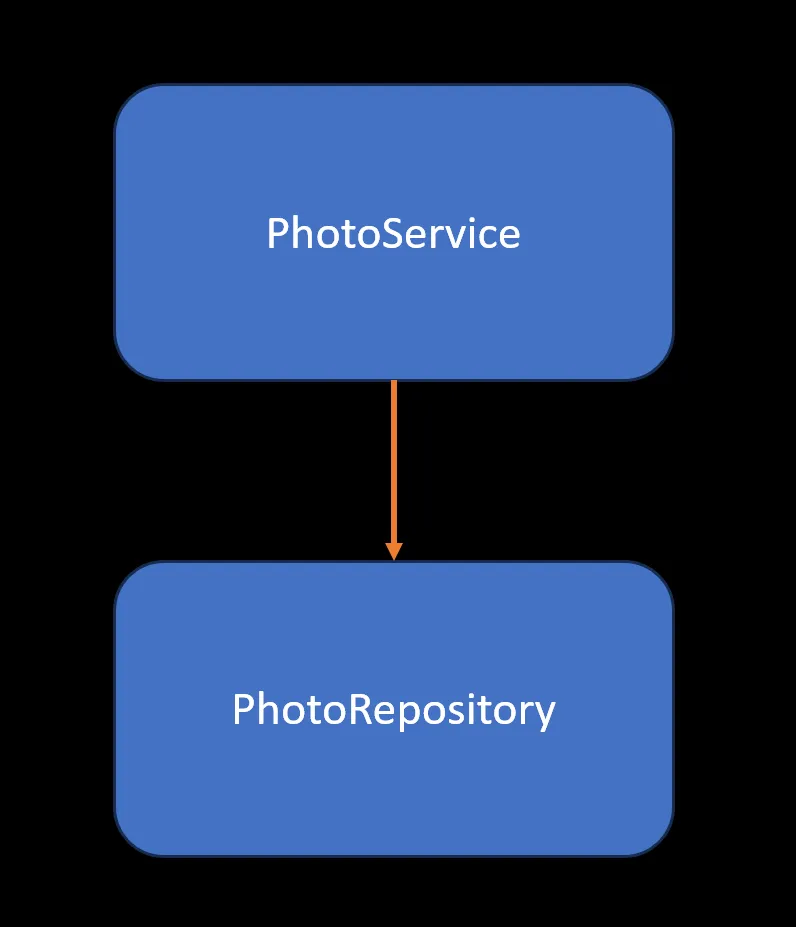
Since we’re depending directly on an implementation, there’s high
coupling
between both classes. This could cause problems for us in the future if
we have to change PhotoRepository (for example, if it now has to talk
to a different database).
By applying the Dependency Inversion Principle, we create an
abstraction: in this case an IPhotoRepository interface that defines
a contract.
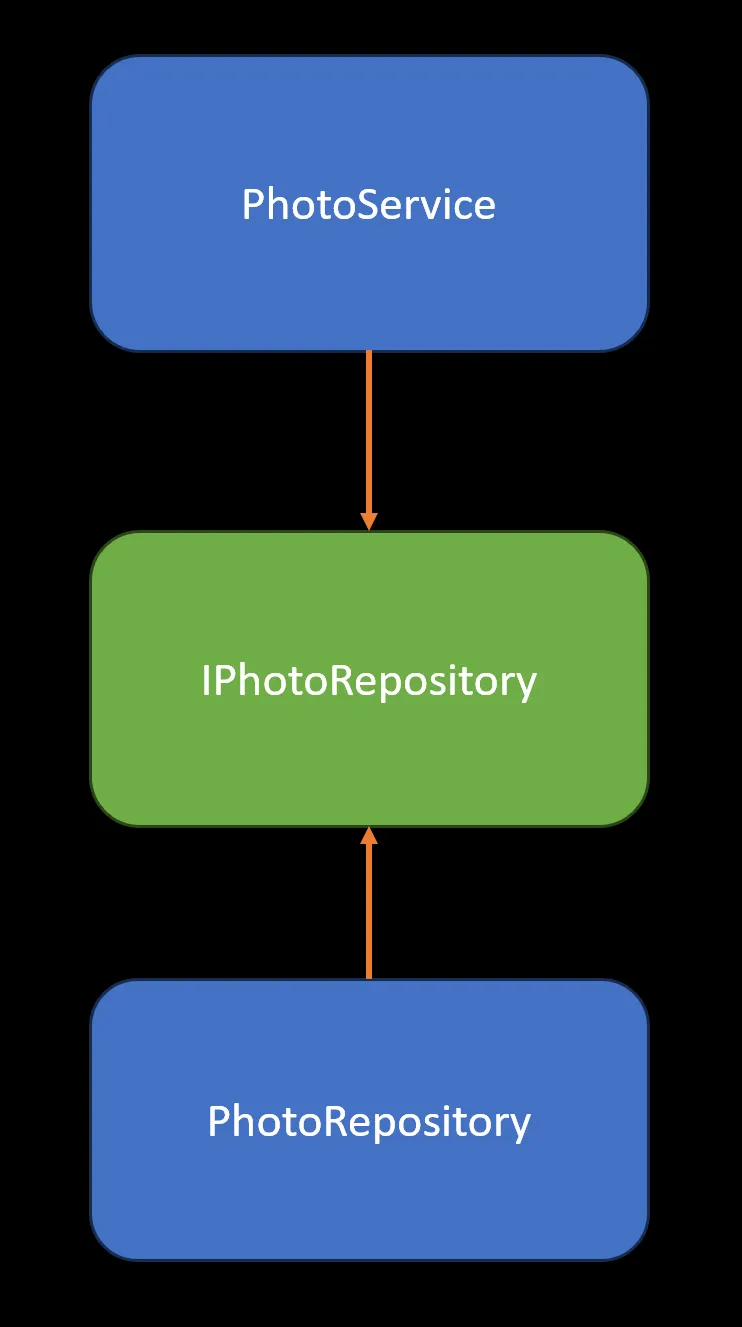
Now PhotoService depends on that interface and not on the
implementation. PhotoRepository, in turn, implements that contract.
Now the system is more flexible because whenever PhotoRepository
needs to change, as long as it respects the interface (which serves as
the contract) there shouldn’t be any compatibility issues.
The code would look something like this in a NestJS project, which has a dependency injection system:
export interface IPhotoRepository {
  findAll(): Promise<Photo[]>;
}
import { Inject } from '@nestjs/common':

export class PhotoService {
  constructor(
    @Inject('photoRepository')
    private readonly photoRepository: IPhotoRepository,
  ) {
  }

  public async findAll(): Promise<Photo[]> {
    return await this.photoRepository.findAll();
  }
}
PhotoService depends on the interface (an abstraction) and not on an
implementation. With the @Inject decorator, to which we pass the
photoRepository token, we’re telling NestJS to handle injecting the
dependency. How does NestJS know which implementation to use? When
configuring the module, we specify the providers, where the
photoRepository dependency injection token is associated with a
class that implements the interface:
@Module({
  providers: [
    {
      provide: "photoRepository",
      useClass: PhotoRepository,
    },
  ],
})
export class PhotoModule {}
Another benefit of applying this principle is that unit tests become easier, since you can easily inject a mock class in place of the dependency.
DIP in React
Although it’s not used often in the Frontend, let’s see how we could apply the idea. Going back to our user report component, it’s now fetching the list of users from a hook, but something has changed:
import { UserService } from "../service";

export function UsersReport() {
  const { users, isLoadingUsers } = UserService.useGetUsers();

  return isLoadingUsers ? (
    <>Loading Users</>
  ) : (
    users.map((user) => <div>{user.name}</div>)
  );
}
Did you notice something different? We’re using a service,
UserService. This isn’t very common in the Frontend world; what we’re
doing is grouping related functions into an object as a way to organize
the code:
export const UserService = {
  useGetUsers,
  useManageUsers,
}

function useGetUsers() {
  ...

  return {
    users,
    isLoadingUsers,
  }
}

function useManageUsers() {
  ...

  return {
    createUser,
    deleteUser,
  }
}
As we can see, the hooks remain individual functions, but they’re
exported through an object. That way, when the hook is consumed, it’s
called through the UserService.useGetUsers() object, communicating
the context it belongs to. We don’t need to group the code this way to
apply DIP, but it helps us compare it with the OOP-based code we showed
earlier (where classes are used to group related methods).
Now let’s look at the code for useGetUsers(). Try to spot something
new:
function useGetUsers() {
  const { getAll }: IUserRepository = useUserRepository();
  const [users, setUsers] = useState<User[]>([]);
  const [isLoadingUsers, setIsLoadingUsers] = useState<boolean>(true);

  // Load users from API
  useEffect(() => {
    async function loadUsers() {
      const data = await getAll();
      setUsers(data);
      setIsLoadingUsers(false);
    }

    loadUsers();
  }, [getAll]);

  return {
    users,
    isLoadingUsers,
  };
}
We’re calling useUserRepository(), which returns the implementation
of an IUserRepository interface that defines a contract of functions:
export interface IUserRepository {
  getAll(): Promise<User[]>;
  create(user: Partial<User>): Promise<void>;
  update(user: Partial<User>): Promise<void>;
  remove(userId: string): Promise<void>;
}
This way we’re depending on an interface and not on the implementation. But how can we provide the implementation in React? One way to do it is using Context. It was originally designed to share state across a component tree and thus avoid prop drilling. But here we see how to use Context for dependency injection. First we need a context that refers to the interface:
import { createContext } from "react";

export const UserRepositoryContext = createContext<IUserRepository | null>(
  null,
);
We also need a Provider, where we associate the interface with the
implementation (in this case UserFetchRepository):
type UserRepositoryProviderProps = {
  children: React.ReactNode;
};

export function UserRepositoryProvider({
  children,
}: UserRepositoryProviderProps) {
  const contextValue: IUserRepository = new UserFetchRepository();

  return (
    <UserRepositoryContext.Provider value={contextValue}>
      {children}
    </UserRepositoryContext.Provider>
  );
}
Finally we add a hook that exposes the context containing the
IUserRepository dependency:
export function useUserRepository() {
  const context = useContext(UserRepositoryContext);
  if (!context) {
    throw new Error(
      `useDependencies must be used within UserRepositoryProvider`,
    );
  }
  return context;
}
For this to work we have to make sure we use the provider when rendering the app, before rendering the report component (which uses the service that in turn makes use of the dependency):
export function App() {
  return (
    <UserRepositoryProvider>
      <UsersReport />
      <UserCreationForm />
    </UserRepositoryProvider>
  );
}
The important point is that we’re depending on the IUserRepository
interface (an abstraction) and not on a specific implementation:
function useGetUsers() {
  const { getAll }: IUserRepository = useUserRepository();
Going back to the Provider, which is where we’re providing the
implementation, we can swap it for another one — in this case using
UserAxiosRepository instead of UserFetchRepository:
export function UserRepositoryProvider({
  children,
}: UserRepositoryProviderProps) {

  const contextValue: IUserRepository = new UserAxiosRepository();
For reference, here’s the UserAxiosRepository() implementation class:
import axios from "axios";
import { User } from "../../../types";
import { IUserRepository } from "../interface";

export class UserAxiosRepository implements IUserRepository {
  public async getAll(): Promise<User[]> {
    return axios.get("/api/user");
  }

  public async create(user: Partial<User>): Promise<void> {
    return axios.post("/api/user", user);
  }

  public async update(user: Partial<User>): Promise<void> {
    return axios.put("/api/user", user);
  }

  public async remove(userId: string): Promise<void> {
    await axios.delete(`/api/user/${userId}`);
  }
}
Many JavaScript libraries use classes. This is one way to inject a
global instance that can be accessed from any hook.
Now, if we don’t want to use a class we can also use an object with
functions, as we saw earlier, in this case for
UserFetchRepository:
import { User } from "../../../types";
import { IUserRepository } from "../interface";

export const UserFetchRepository: IUserRepository = {
  getAll,
  create,
  update,
  remove,
};

async function getAll(): Promise<User[]> {
  const response = await fetch("/api/user");
  return await response.json();
}

async function create(user: Partial<User>): Promise<void> {
  await fetch("/api/user", {
    method: "POST",
    body: JSON.stringify(user),
  });
}

async function update(user: Partial<User>): Promise<void> {
  await fetch("/api/user", {
    method: "PUT",
    body: JSON.stringify(user),
  });
}

async function remove(userId: string): Promise<void> {
  await fetch(`/api/user/${userId}`, {
    method: "DELETE",
  });
}
The difference is that when injecting the dependency we don’t need to create an instance of a class, but instead reference the object directly:
export function UserRepositoryProvider({
  children,
}: UserRepositoryProviderProps) {

  const contextValue: IUserRepository = UserFetchRepository;
Regardless of which implementation we’re using, the UserService hooks
don’t change. This turns out to be beneficial when we use a library
that might change in the future (whether it’s a new version of the same
library or a different one entirely). Since we have low coupling, we
only need to change one part of the code, and the rest (protected
through the interface) doesn’t change.
Now let’s look at a simpler way to apply the Dependency Inversion
Principle. We have a user creation/update form. When the form is
submitted, handleSubmit() is called, which decides whether to
create or update depending on whether the user already exists, received
as an optional prop in UserForm:
type UserFormProps = {
  user?: User;
};

export function UserForm({ user }: UserFormProps) {
  const { createUser, updateUser } = useManageUsers();

  const [name, setName] = useState<string>(user ? user.name : "");

  function handleNameChange(event: React.ChangeEvent<HTMLInputElement>) {
    setName(event.target.value);
  }

  function handleSubmit(event: React.FormEvent) {
    event.preventDefault();
    if (!name) {
      alert("User name is not valid");
      return;
    }

    if (user) {
      const updatedUser = {
        ...user,
        name,
      };
      updateUser(updatedUser);
    } else {
      createUser(name);
    }
  }

  return (
    <form onSubmit={handleSubmit}>
      <label>
        Name:
        <input type="text" value={name} onChange={handleNameChange} />
      </label>
      <button type="submit">Create</button>
    </form>
  );
}
Let’s compare it with this other implementation. The form now receives
an onSubmit function as a prop:
type UserFormProps = {
  user?: User;
  onSubmit: (user: Partial<User>) => Promise<void>;
};

export function UserForm({ user, onSubmit }: UserFormProps) {
  const [name, setName] = useState<string>(user ? user.name : "");

  function handleNameChange(event: React.ChangeEvent<HTMLInputElement>) {
    setName(event.target.value);
  }

  function handleSubmit(event: React.FormEvent) {
    event.preventDefault();
    if (!name) {
      alert("User name is not valid");
      return;
    }

    const updatedUser: Partial<User> = {
      ...user,
      name: name,
    };

    onSubmit(updatedUser);
  }

  return (
    <form onSubmit={handleSubmit}>
      <label>
        Name:
        <input type="text" value={name} onChange={handleNameChange} />
      </label>
      <button type="submit">Create</button>
    </form>
  );
}
This way control is inverted to the parent, which defines what to
do once the form is ready to send the information to the backend.
UserCreate will create the user:
export function UserCreate() {
  const { createUser } = useManageUsers();

  async function handleSubmit(user: Partial<User>) {
    if (!user.name) {
      return;
    }

    await createUser(user.name);
  }

  return <UserForm onSubmit={handleSubmit} />;
}
While UserUpdate will update the user:
export function UserUpdate() {
  const { updateUser } = useManageUsers();

  async function handleSubmit(user: Partial<User>) {
    if (!user.name) {
      return;
    }

    await updateUser(user);
  }

  return <UserForm onSubmit={handleSubmit} />;
}
Conclusion
The SOLID principles don’t solve every design problem in code. Applying them shouldn’t be forced — it’s better to use them when there’s a reason to. If the code becomes more understandable after applying them, and maintaining it (supporting change) becomes easier, then they’ve achieved their goal. But if the code becomes too complicated without a good reason, if they don’t bring any benefit, then the SOLID principles are being forced and aren’t worth it.
In programming there are always several good ways to do things. These principles are primarily based on Object-Oriented Programming, but the ideas can be applied to functional programming and to React, even on the Frontend.
Here you can access the code explained in this article: iencotech/react-solid.